
 English
 Lithuanian
 Latvian
 Русский

Dota 2 Update - November 26th, 2013
November 27, 2013
DIRETIDE
- Wave of Force damage is no longer reflectable
WORKSHOP
- Enabled Luna on the workshop with new model and texture files
- Updated workshop model and texture files (including fbx) for Lion, Axe, Omniknight, Nature's Prophet, Juggernaut, Naga Siren, Ogre Magi, Tidehunter, and Ursa.
- Enabled alpha test for Earthshaker materials
UI
- Improved Chinese IME support.
- Wave of Force damage is no longer reflectable
WORKSHOP
- Enabled Luna on the workshop with new model and texture files
- Updated workshop model and texture files (including fbx) for Lion, Axe, Omniknight, Nature's Prophet, Juggernaut, Naga Siren, Ogre Magi, Tidehunter, and Ursa.
- Enabled alpha test for Earthshaker materials
UI
- Improved Chinese IME support.
Dota 2 Update - November 25th, 2013
November 26, 2013
DIRETIDE - Sugar Rush
- Removed Roshan's 50% Base Magic Resistance
- Illusions can no longer be created in this phase
- Roshan can no longer be Rooted
LINUX/MAC OS X
- [OSX] Fixed crash for some users, especially when Command-tabbing.
- [OSX] Made Ctrl-click function like a right click.
- Upgraded to SDL 2.0.1
- Removed Roshan's 50% Base Magic Resistance
- Illusions can no longer be created in this phase
- Roshan can no longer be Rooted
LINUX/MAC OS X
- [OSX] Fixed crash for some users, especially when Command-tabbing.
- [OSX] Made Ctrl-click function like a right click.
- Upgraded to SDL 2.0.1
Dota 2 Update - November 22nd, 2013
November 23, 2013
- Fixed -workshop command line parameter not initializing correctly (caused various issues, including not requiring particle date for items that have attached particle systems)
- Self-Made items can no longer be chiseled, socketed, or hammered.
- Gems extracted from an item that is "tradable after date" or "cannot be traded" will gain the same property.
- The 'you have new items' notification has had a few issues fixed. This message will also now expire after 60 seconds if ignored.
- The pickup items screen has been removed. New items will be shown when the user enters the armory as popups.
- Some issues with client item acknowledgement have been fixed that caused items to be "invisible" to the armory but visible in the Steam backpack.
- When an item is hammered and its gems extracted, the now gemless item and the extracted gems will all popup as newly found items.
- A bug that caused gems to get stacked on top of the item they were extracted from in the armory UI has been fixed. Items that are hidden under gems can be found by moving the gems or sorting the backpack.
- We are in the process of restoring items that had their original special quality (genuine, vintage, etc) changed by gems. At the moment the Inscribed, Autographed, and Ascended qualities will only be set on items that have no other special quality.
- The reason for a new item entering the armory is now displayed in the item drop popup, i.e.: "Customer Support Granted You:" or "You Earned a Drop:"
- After acknowledging a new item drop, the armory will flip to the page where the item has been placed.
- After closing the socketing and crafting UIs the armory will return to its original page instead of going to page 1.
- Added new armory filters: "Is Equipped" and "Number of Sockets"
- You can now preview color and effect changes in the socketing UI before committing the changes.
- Fixed Necrophos VO playing at half speed.
- Fixed Juggernaut VO not playing.
- Added belt slot to Pudge
- The Star Series 8 Prize Pool has been correctly updated to $50,000 base.
- Fixed a case where html and 3D views in the UI could become corrupt after using alt-tab
- Fixed a crash when using alt-tab
- Fixed a crash when watching long replays on 32-bit windows
- New custom item sets for Abaddon, Bounty Hunter and Sand King as well as Coco the Courageous courier
- Self-Made items can no longer be chiseled, socketed, or hammered.
- Gems extracted from an item that is "tradable after date" or "cannot be traded" will gain the same property.
- The 'you have new items' notification has had a few issues fixed. This message will also now expire after 60 seconds if ignored.
- The pickup items screen has been removed. New items will be shown when the user enters the armory as popups.
- Some issues with client item acknowledgement have been fixed that caused items to be "invisible" to the armory but visible in the Steam backpack.
- When an item is hammered and its gems extracted, the now gemless item and the extracted gems will all popup as newly found items.
- A bug that caused gems to get stacked on top of the item they were extracted from in the armory UI has been fixed. Items that are hidden under gems can be found by moving the gems or sorting the backpack.
- We are in the process of restoring items that had their original special quality (genuine, vintage, etc) changed by gems. At the moment the Inscribed, Autographed, and Ascended qualities will only be set on items that have no other special quality.
- The reason for a new item entering the armory is now displayed in the item drop popup, i.e.: "Customer Support Granted You:" or "You Earned a Drop:"
- After acknowledging a new item drop, the armory will flip to the page where the item has been placed.
- After closing the socketing and crafting UIs the armory will return to its original page instead of going to page 1.
- Added new armory filters: "Is Equipped" and "Number of Sockets"
- You can now preview color and effect changes in the socketing UI before committing the changes.
- Fixed Necrophos VO playing at half speed.
- Fixed Juggernaut VO not playing.
- Added belt slot to Pudge
- The Star Series 8 Prize Pool has been correctly updated to $50,000 base.
- Fixed a case where html and 3D views in the UI could become corrupt after using alt-tab
- Fixed a crash when using alt-tab
- Fixed a crash when watching long replays on 32-bit windows
- New custom item sets for Abaddon, Bounty Hunter and Sand King as well as Coco the Courageous courier
Dota 2 Update - November 21st, 2013
November 22, 2013
- New Venomancer model
- Update to Gyrocopter model
- Update to Axe visuals
- Update to Luna model
- Update to Omniknight colors
- Update to Dazzle model
- Update to Pudge model
- Necrolyte changed to Necrophos
- Windrunner changed to Windranger
- Lycanthrope changed to Lycan
- Updated Necrophos voice processing.
- Bug Fix : Unusual Couriers will properly stop Unusual Effects on death.
- Workshop Fix : Workshop weapon submissions for Abaddon will include materialize/dematerialize settings.
- Added Teammate cooperation survey question
Diretide:
- More Flesh Heap fixes for Diretide
- Cleave no longer affects Roshan in Diretide
- Roshan movement cannot be obstructed during Sugar Rush
- Magic Resistance increase reduced from 10 per level to 5 per level
- Base Magic Resistance increased from 0 to 50%
- Update to Gyrocopter model
- Update to Axe visuals
- Update to Luna model
- Update to Omniknight colors
- Update to Dazzle model
- Update to Pudge model
- Necrolyte changed to Necrophos
- Windrunner changed to Windranger
- Lycanthrope changed to Lycan
- Updated Necrophos voice processing.
- Bug Fix : Unusual Couriers will properly stop Unusual Effects on death.
- Workshop Fix : Workshop weapon submissions for Abaddon will include materialize/dematerialize settings.
- Added Teammate cooperation survey question
Diretide:
- More Flesh Heap fixes for Diretide
- Cleave no longer affects Roshan in Diretide
- Roshan movement cannot be obstructed during Sugar Rush
- Magic Resistance increase reduced from 10 per level to 5 per level
- Base Magic Resistance increased from 0 to 50%
Dota 2 Update - November 20th, 2013
November 21, 2013
The winners of today's Diretide cycle have been chosen a bit differently: Due to a bug in our UI the top score did not actually represent the current kill leader. Some teams went as far as they could, reaching an impressive 218 level kill. Others played the timing game and tried to one up who they thought the current leader was based on the Leaderboard.
We've decided to reward winners of both the highest level kill and the current highest score on the Leaderboard.
Cycle 7 Diretide Changes:
- Roshan can no longer be hexxed or stunned during Sugar Rush.
- The Sugar Rush Hall of Fame no longer displays the current cycle's high score. It will display the high score only once the cycle has completed.
We've decided to reward winners of both the highest level kill and the current highest score on the Leaderboard.
Cycle 7 Diretide Changes:
- Roshan can no longer be hexxed or stunned during Sugar Rush.
- The Sugar Rush Hall of Fame no longer displays the current cycle's high score. It will display the high score only once the cycle has completed.
Dota 2 Update - November 19th, 2013
November 20, 2013
* Couriers that scale their particle effects based on their games viewed will work again.
* Fixed several bugs that caused recipes to be generated with incorrect requirements.
* Fixed a bug that caused the UI for a recipe that requires multiple inputs of a particular rarity to incorrectly display a requirement for a specific item once the input requirement was partially fulfilled.
* Uncraftable items will no longer be generated as required inputs for recipes. Recipes that currently have uncraftable inputs will be adjusted to require a random item of the same rarity.
* Fixed a bug where inscribed gems would only display their first digit on the Steam Community Market.
* Inscribed gems now are named only by the type of stat they track instead of the type of stat they track and the value. This means that all items of the same type will appear together on the Steam Community Market. I.e.: No more "Kills: 1" category and "Kills: 2" category instead there would just be one "Kills" category.
Diretide Candy Rush changes:
- Roshan no longer belly aches.
- Roshan refreshes hero abilities only once per life at 50%.
- Roshan cannot be frozen, disarmed, or silenced.
- Roshan can be stunned and hexed.
- Roshan has a Spell Block ability (10 sec cooldown).
* Fixed several bugs that caused recipes to be generated with incorrect requirements.
* Fixed a bug that caused the UI for a recipe that requires multiple inputs of a particular rarity to incorrectly display a requirement for a specific item once the input requirement was partially fulfilled.
* Uncraftable items will no longer be generated as required inputs for recipes. Recipes that currently have uncraftable inputs will be adjusted to require a random item of the same rarity.
* Fixed a bug where inscribed gems would only display their first digit on the Steam Community Market.
* Inscribed gems now are named only by the type of stat they track instead of the type of stat they track and the value. This means that all items of the same type will appear together on the Steam Community Market. I.e.: No more "Kills: 1" category and "Kills: 2" category instead there would just be one "Kills" category.
Diretide Candy Rush changes:
- Roshan no longer belly aches.
- Roshan refreshes hero abilities only once per life at 50%.
- Roshan cannot be frozen, disarmed, or silenced.
- Roshan can be stunned and hexed.
- Roshan has a Spell Block ability (10 sec cooldown).
Dota 2 Update - November 18th, 2013
November 19, 2013
- Roshan is now unaffected by Hex and Root interruption
- You can now use a password to only match against other players with the same password in Diretide Matchmaking
- You can now use a password to only match against other players with the same password in Diretide Matchmaking
Dota 2 Update - November 15th, 2013
November 16, 2013
- Trading functionality has been restored.
- Earth Spirit: Fixed an issue with Refreshing Rolling Boulder while already rolling.
- Earth Spirit: Fixed refreshed Boulder Smash causing units to teleport.
- Earth Spirit: Fixed a smashed Stone Remnant that got gripped still applying damage and silence to units in its old path.
- Earth Spirit: Fixed Magnetize and Rolling Boulder not applying their debuffs to magic immune enemies.
- Ember Spirit: Fixed Flame Guard doing damage in too slow of intervals.
- Ember Spirit: Fixed some cases where Searing Chains could do less damage tickets
- Storm Spirit: Fixed Storm Spirit not showing the minimap while in Ball Lightning.
- Death Prophet: Fixed Exorcism ghosts attacking Attack Immune targets.
- Meepo: Fixed clones not gaining XP.
- Rubick: Can no longer steal Stone Caller.
- Fixed legacy_mode_quick_cast interaction with items to test.
- Fixed a crash when using Keeper of the Light in last-hit practice games.
- Fixed Wisp subtitles.
- Reduced Stone Remnant model size
- Fixed the lava trail effect not having a name and having the wrong color values at default.
- Fixed missing Tabard of the Crested Cannoneer from Sing's Artillery of the Crested Cannoneer Set. Users that have already purchased this set have been granted the missing item.
- Fixed health bar in HUD sometimes being invisible at match start.
- Fixed an issue with Quick Buy for Coaches and Spectators.
- The Inscribed, Autographed, and Ascendant qualities will only be applied to items that have no other quality and will be removed when the item is hammered.
- Qualities that got into a weird state from gems (like missing genuine tags) will be restored this afternoon.
- Heroic items will now display their tournament properties correctly.
- The lava trail unusual effect should now have its correct appearance as well as an effect name.
Diretide:
- Increased the drop rate of special rewards given for killing higher levels of Roshan to 33% per level.
When you start Sugar Rush (Phase 2):
- All heroes are upgraded to level 25.
- Your gold now counts up at 1000/sec.
- Pudge's Flesh Heap is reset to 1.
- The timer to fight Roshan doesn't start until he either takes damage or 5 minutes have elapsed.
- Earth Spirit: Fixed an issue with Refreshing Rolling Boulder while already rolling.
- Earth Spirit: Fixed refreshed Boulder Smash causing units to teleport.
- Earth Spirit: Fixed a smashed Stone Remnant that got gripped still applying damage and silence to units in its old path.
- Earth Spirit: Fixed Magnetize and Rolling Boulder not applying their debuffs to magic immune enemies.
- Ember Spirit: Fixed Flame Guard doing damage in too slow of intervals.
- Ember Spirit: Fixed some cases where Searing Chains could do less damage tickets
- Storm Spirit: Fixed Storm Spirit not showing the minimap while in Ball Lightning.
- Death Prophet: Fixed Exorcism ghosts attacking Attack Immune targets.
- Meepo: Fixed clones not gaining XP.
- Rubick: Can no longer steal Stone Caller.
- Fixed legacy_mode_quick_cast interaction with items to test.
- Fixed a crash when using Keeper of the Light in last-hit practice games.
- Fixed Wisp subtitles.
- Reduced Stone Remnant model size
- Fixed the lava trail effect not having a name and having the wrong color values at default.
- Fixed missing Tabard of the Crested Cannoneer from Sing's Artillery of the Crested Cannoneer Set. Users that have already purchased this set have been granted the missing item.
- Fixed health bar in HUD sometimes being invisible at match start.
- Fixed an issue with Quick Buy for Coaches and Spectators.
- The Inscribed, Autographed, and Ascendant qualities will only be applied to items that have no other quality and will be removed when the item is hammered.
- Qualities that got into a weird state from gems (like missing genuine tags) will be restored this afternoon.
- Heroic items will now display their tournament properties correctly.
- The lava trail unusual effect should now have its correct appearance as well as an effect name.
Diretide:
- Increased the drop rate of special rewards given for killing higher levels of Roshan to 33% per level.
When you start Sugar Rush (Phase 2):
- All heroes are upgraded to level 25.
- Your gold now counts up at 1000/sec.
- Pudge's Flesh Heap is reset to 1.
- The timer to fight Roshan doesn't start until he either takes damage or 5 minutes have elapsed.
Three Spirits Update
November 14, 2013
Here we go!
The latest Dota 2 update introduces the three amigos: Ember Spirit, Storm Spirit and Earth Spirit, and features like Crafting, Coaching and the givin' of the Diretide.
You can visit the Three Spirits Update page for more info by clicking the image below.
<a href="http://www.dota2.com/threespirits"><img class="alignnone" title="Storm! Earth! Ember! Heart (of Tarrasque)!" alt="" src="http://media.steampowered.com/apps/dota2/images/blogfiles/blog_image_threespirits.png" width="576" height="481" /></a>
The update should be hitting the Test client any second now and your regular Dota 2 client tomorrow.
The latest Dota 2 update introduces the three amigos: Ember Spirit, Storm Spirit and Earth Spirit, and features like Crafting, Coaching and the givin' of the Diretide.
You can visit the Three Spirits Update page for more info by clicking the image below.
<a href="http://www.dota2.com/threespirits"><img class="alignnone" title="Storm! Earth! Ember! Heart (of Tarrasque)!" alt="" src="http://media.steampowered.com/apps/dota2/images/blogfiles/blog_image_threespirits.png" width="576" height="481" /></a>
The update should be hitting the Test client any second now and your regular Dota 2 client tomorrow.
Three Spirits Update
November 14, 2013
Here we go!
The latest Dota 2 update introduces the three amigos: Ember Spirit, Storm Spirit and Earth Spirit, and features like Crafting, Coaching and the givin' of the Diretide.
You can visit the Three Spirits Update page for more info by clicking the image below.
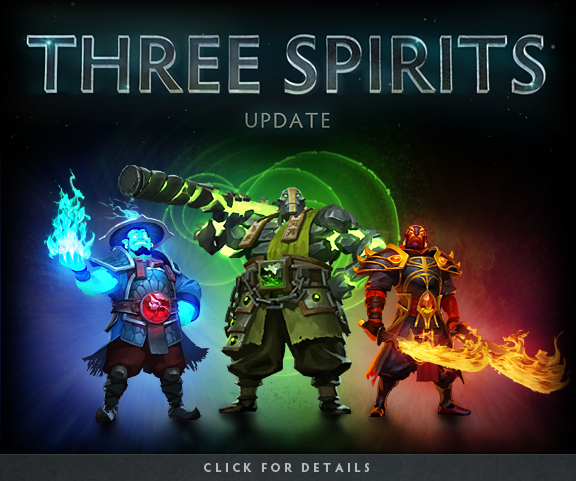
The update should be hitting the Test client any second now and your regular Dota 2 client tomorrow.
The latest Dota 2 update introduces the three amigos: Ember Spirit, Storm Spirit and Earth Spirit, and features like Crafting, Coaching and the givin' of the Diretide.
You can visit the Three Spirits Update page for more info by clicking the image below.
The update should be hitting the Test client any second now and your regular Dota 2 client tomorrow.